No DIAdem
Inspect TDMS files without requiring a DIAdem environment.
TdmsSlice
Open TDMS files, inspect Channels and metadata, preview supported data, select the required range, and export it to CSV with companion metadata.
Windows 11 x64 · Portable ZIP · Local processing · No separate Python installation required
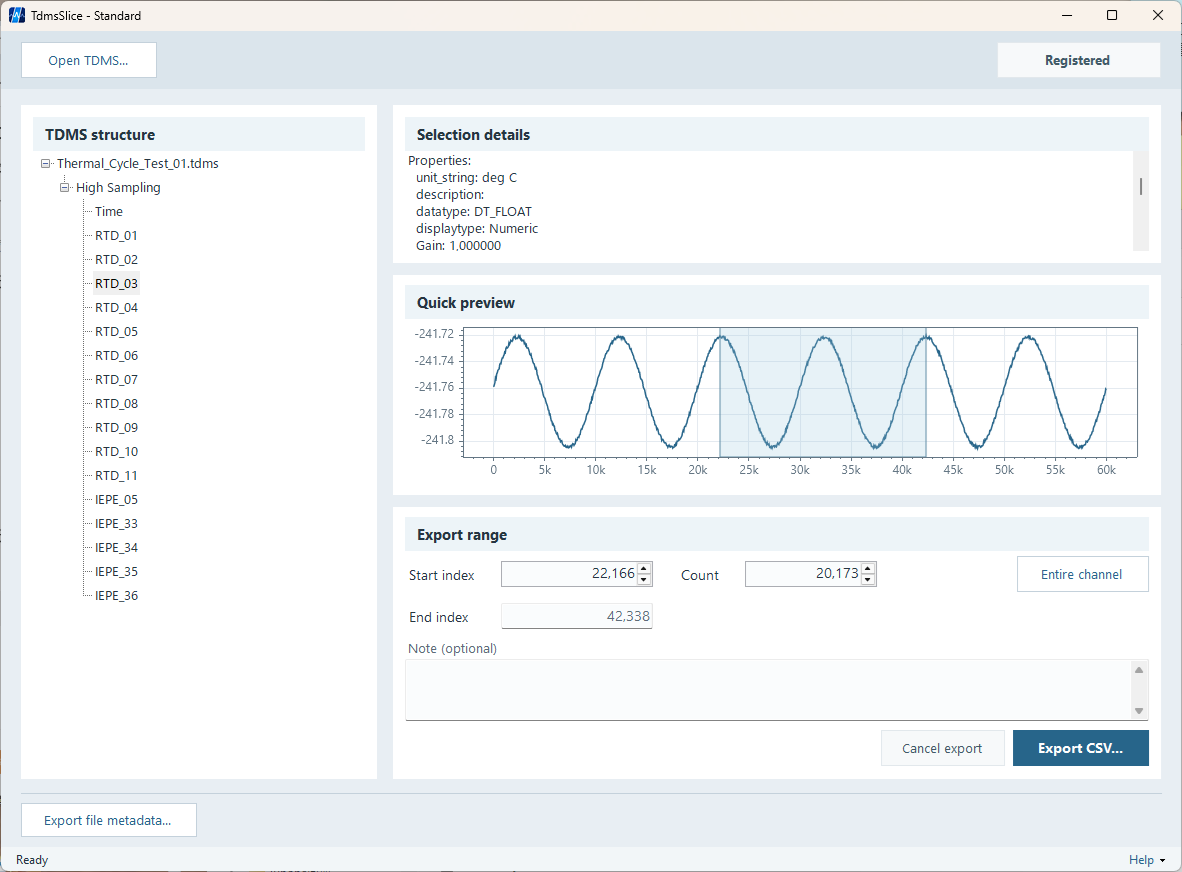
TdmsSlice is designed for practical TDMS inspection and data export tasks rather than broad, all-purpose measurement analysis.
Inspect TDMS files without requiring a DIAdem environment.
Export only the Channel range you actually need.
Check Channels and metadata before writing analysis code.
Focus on a specific Channel instead of the whole file.
Keep the original Channel sample index in CSV output.
Store useful source context alongside exported data.
TdmsSlice exports selected data from a TDMS Channel to CSV. It does not create a smaller TDMS file.
Inspect Groups, Channels, data types, sample counts, and properties.
Check the overall shape of supported Channel data before export.
Specify the required data using Start Index and Count.
Export the selected Channel range while preserving its sample index.
Include a usable time axis when waveform timing information is available.
Save source and selection information alongside the CSV.
TDMS files can contain more than ordinary floating-point waveform data. TdmsSlice supports a broad range of data types for Quick Preview and/or CSV export.
Preview availability varies by data type.
View Supported Formats →CSV is convenient, but conversion can remove important context. TdmsSlice creates a companion metadata JSON file for each CSV export.
It can record the source file, Group and Channel, selected range, data type, sample count, and TDMS properties.
Evaluation uses the same core TDMS reading, supported data types, Quick Preview, metadata features, and safety behavior as Standard.
CSV export in Evaluation is limited to 100 samples per export.
Download Evaluation| Feature | Evaluation | Standard |
|---|---|---|
| TDMS reading | Same core support | Same core support |
| Metadata inspection | Yes | Yes |
| Quick Preview | Yes | Yes |
| Range selection | Yes | Yes |
| CSV export | Up to 100 samples / export | No Evaluation sample limit |
| Metadata JSON | Yes | Yes |
| Normal use | Offline | Offline |
| Price | Free | To be announced |
Yes. TdmsSlice is designed to inspect TDMS structure, Channels, metadata, and supported Channel data without requiring DIAdem.
Yes. Select the Channel, specify Start Index and Count, and export only that selected range.
No. TdmsSlice does not create or rewrite TDMS files. It exports selected Channel data to CSV with companion metadata JSON.
No. The required Python runtime and TDMS-reading components are included with TdmsSlice.
These formats are supported for CSV export and/or Quick Preview. Availability differs by data type.
Inspect the file, preview its Channels, and export a small sample before deciding whether Standard fits your workflow.
Download TdmsSlice EvaluationWindows 11 x64 · Portable ZIP · Local processing · No separate Python installation required